

Your job application tracker should record the employer, job title, vacancy reference, closing date, date applied, documents sent, current status and next action. Keep the advert and submission confirmation alongside that record so you can identify a callback, prepare for an interview and follow up without guessing.
- A job application tracker needs the vacancy, submission details, current status and next action in one record.
- Record the exact CV filename, not just that you sent a CV.
- No reply means no reply; do not record rejection without confirmation.
- Blessingmdigital’s CV & Job-Search System suits South African applicants who want files for each application step.
What should you record in a job application tracker?
Record enough information to answer three questions: what did you apply for, what did you send, and what happens next? Start with the fields below. Add detail only when it helps you take an action or recognise the application later.
Before recording a CV as ready to send, check the saved PDF before applying. Your tracker should name the checked file you actually submitted, not an earlier draft.
| Field | What to record | Why you need it |
|---|---|---|
| Employer | Name shown on the advert | Identifies the organisation behind a callback |
| Job title | Exact advertised title | Separates similar vacancies |
| Vacancy reference | Reference supplied by the employer | Connects your application to the correct post |
| Location | City, branch or stated work arrangement | Distinguishes roles with the same title |
| Advert source | Where you found it and where you saved a copy | Lets you revisit the requirements |
| Closing date | Date and time stated in the advert | Supports deadline planning |
| Date applied | Actual submission date | Establishes when you sent the application |
| Application method | Portal, email or another instructed method | Shows where to check confirmation |
| Documents sent | Exact filenames and versions | Shows what the employer received |
| Confirmation | Email, receipt or reference received | Provides evidence of submission |
| Current status | Latest confirmed stage | Separates facts from assumptions |
| Next action | Task, date and reason | Turns the record into a working plan |
| Contact notes | Name, role and relevant conversation details | Helps you respond consistently |
| Outcome | Confirmed decision and date | Closes the application record |
If the advert gives no vacancy reference, leave that field blank or mark it as not supplied. Do the same with a closing date that is not stated. An invented deadline makes the tracker less reliable, not more complete.
Why this matters
A tracker is useful when an employer calls and you need to find the relevant advert and CV immediately. It is also useful before applying: you can see whether you already submitted for that vacancy instead of sending another application by mistake.
For your 2026 job search, treat the tracker as a record of actions and evidence. It cannot tell you whether an employer has read your CV, and it does not guarantee an interview. Its job is to make your own application process easier to check.
How do you build a tracker you will actually use?
Use a format you can update on the device you normally use for applications. A spreadsheet is useful for sorting; a notebook works when you prefer handwriting. Neither helps if you leave it untouched after applying.
| Format | Best for | Useful feature | Limitation |
|---|---|---|---|
| Spreadsheet | Applicants who want to sort by deadline or status | Keeps separate fields in columns | File management and wide tables need attention on a phone |
| Notebook | Applicants who prefer a handwritten record | Lets you write details without setting up a file | Cannot sort entries or open saved documents directly |
Choose the format you can maintain, not the format with the most features. Use these steps for every vacancy, whether your tracker is on paper or in a file.
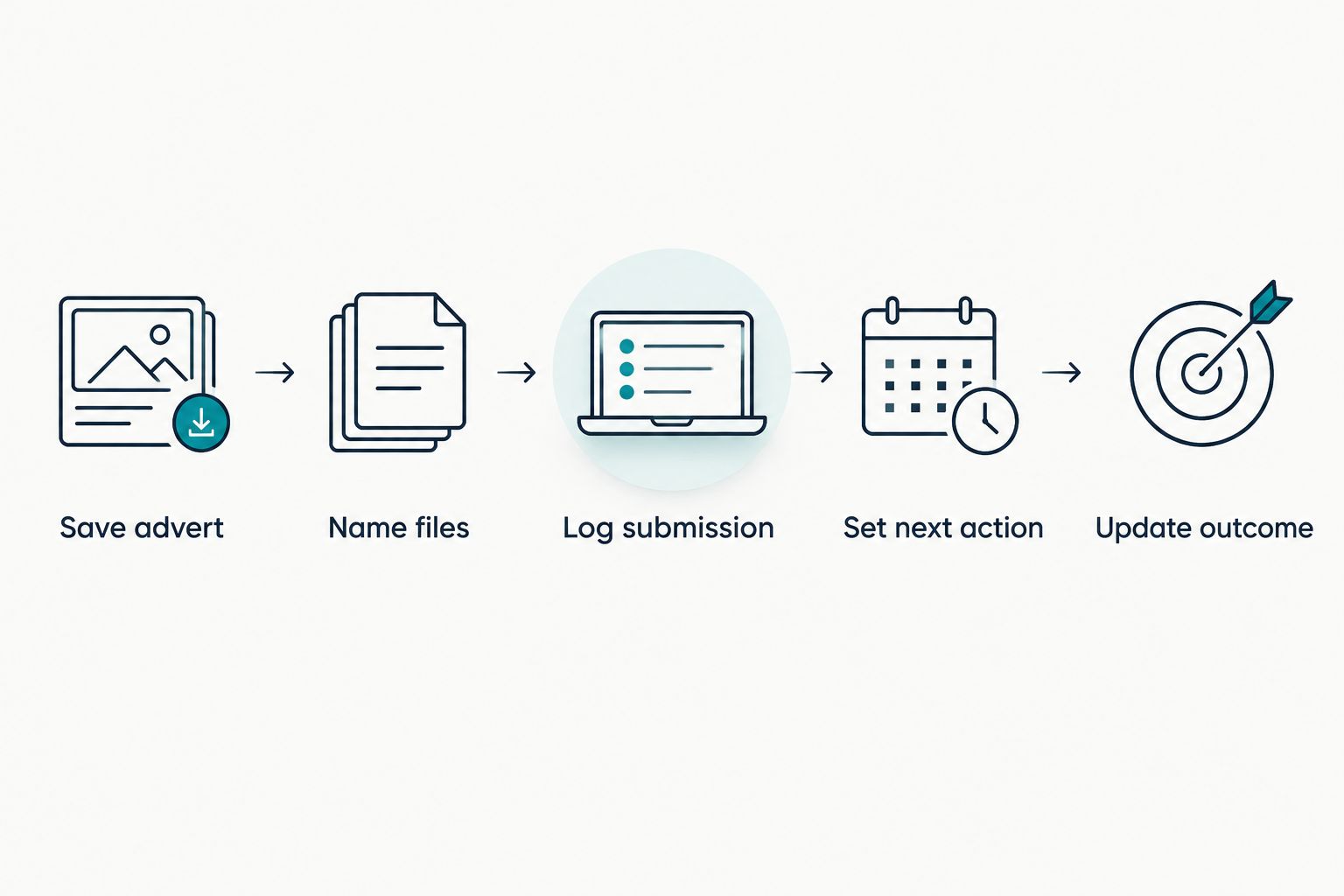
1. Save advert
Keep a copy of the advert before applying. Record the employer, title, reference and stated requirements in your tracker, then note where the copy is stored.
If the advert later disappears, your saved copy still gives you something to prepare from. Do not rely on a job title alone: an administrative role in Bloemfontein and another role with the same title elsewhere need separate records.
2. Name files
Give the application documents clear filenames. Record the exact names in the tracker, including the cover letter or other requested documents.
For example, Naledi_Mokoena_Admin_CV_2026.pdf is easier to identify than final_final.pdf. This is an illustrative filename, not a required naming rule. Keep an editable working document separately from the copy you submit.
3. Log submission
Update the tracker after submitting, not when you intend to submit. Record the date, application method and any confirmation you receive.
If a portal produces a receipt, save it with the application documents. If you receive no confirmation, record that fact rather than writing that the application was successfully received.
4. Set next action
Write a specific task and the reason for its date. Follow the employer's stated instructions about contact and timelines.
An entry such as check the portal after the stated response date is more useful than follow up soon. If the advert says not to contact the employer, record that instruction and do not schedule an unsolicited message.
5. Update outcome
Change the record when something happens: a call, an interview invitation, a request for documents or a decision. Add a short dated note so you can reconstruct the sequence.
Do not overwrite useful information when you change the status. Keep the submission date and document names; those facts still matter after an interview invitation arrives.
These steps connect the advert to your documents, submission evidence and next task. The tracker stays useful because each update records something you can verify.
What does a completed application record look like?
The example below is fictional. It shows how to record an administrative assistant application in Bloemfontein; it is not a real vacancy or a client result.
| Field | Illustrative entry |
|---|---|
| Employer | Example employer |
| Job title | Administrative assistant |
| Vacancy reference | Not supplied |
| Location | Bloemfontein |
| Closing date | 18 September 2026; closing time not stated |
| Date applied | 14 September 2026 |
| Application method | Employer's application portal |
| Documents sent | Naledi_Mokoena_Admin_CV_2026.pdf; tailored cover letter |
| Confirmation | Portal confirmation saved with application files |
| Current status | Applied; confirmation received |
| Next action | Check portal after the response date stated in the advert |
| Contact notes | No direct employer contact yet |
| Outcome | No decision received |
Notice what the entry does not claim. It does not say the applicant passed screening, reached a shortlist or will receive a response. Submission confirmation supports the submission record, not a prediction about the employer's decision.
Which application statuses should you use?
Use short labels with meanings you can apply consistently. A label should describe what you know, not what you hope will happen.
- Preparing: You are working on the application but have not submitted it.
- Applied: You submitted the application and recorded the method and date.
- Interview invited: You received an invitation and need to record the arrangements.
- Awaiting decision: You completed the requested step and have no confirmed outcome.
- Offer received: You received an offer; record any stated response deadline.
- Not selected: The employer confirmed that you were not selected.
- Withdrawn: You decided to stop pursuing the application.
Keep no response received as a factual note. Silence does not establish rejection. Likewise, an interview invitation does not establish an offer, and a request for documents does not establish that you have the job.
Why does the detail in a job application tracker vary?
The right fields depend on what that application requires. Keep the core record consistent, then add fields for the actual process rather than building a large table you never complete.
- Submission method: An email application needs the recipient and sent message; a portal application needs its confirmation details.
- Vacancy instructions: A stated reference, deadline or contact restriction belongs in the record.
- Document requirements: Record each requested document you actually submit, not a generic checklist of everything you own.
- Application stage: An interview creates tasks for preparation, attendance and any requested follow-up.
- Employer communication: A call or message adds information that was not in the original advert.
- Device and format: A phone-based workflow needs fields you can read and update without losing essential details.
Avoid turning the notes column into a second CV. Record the facts you need to manage the application, and keep longer preparation notes with the saved advert.
What should you record after an employer calls?
Record the caller's name, organisation, role discussed and what they asked you to do. Then add the deadline or appointment exactly as communicated, including the time and location or meeting method.
If you did not understand a detail, ask for clarification before recording it as confirmed. A useful note is written interview details requested, rather than a guessed venue or time.
For a call about a 2026 application, find the matching vacancy before preparing your response. Check the title, reference and CV version so you do not discuss the wrong role.
Should you record every CV version you send?
Record the exact CV version for every application. If you tailor your experience section for different roles, a filename tells you which wording the employer has in front of them.
Keep the submitted copy unchanged. Make later edits in your working document, then save a new submission version when you apply elsewhere. This gives you a clear record without pretending that one CV suits every vacancy.
When does a ready-made application system make sense?
Blessingmdigital's CV & Job-Search System suits South African applicants who want files for each application step. The South African CV & Job-Search System is described as one download, with a Start Here guide showing what to open in order.
A narrower option is useful when your main problem is keeping applications and follow-ups in one list. Compare the stated purposes before choosing; do not buy a broader set of files simply because it contains more steps.
| Option | Best for | Stated purpose | Limitation |
|---|---|---|---|
| The South African CV & Job-Search System | Applicants seeking files across the application process | A file for every step, with a Start Here guide | You still need to work through the files and supply your own information |
| Job Application Tracker + Follow-Up Messages | Applicants focused on application records and follow-ups | One list of applications showing which day to message again | You still need to check employer instructions and update each record |
Blessingmdigital's job-search files support your process; they do not replace tailoring, checking documents or responding to employers. Neither option guarantees interviews or jobs.


For a separate pre-submission check, the Free Job Application Checklist contains 35 checks in a 4-page PDF. Use a checklist to inspect the documents before sending; use the tracker to record what you sent and manage what happens afterwards.
FAQ
What should I put in a job application tracker?
Put the employer, job title, vacancy reference, closing date, submission date, documents sent, status and next action in your job application tracker. Keep the advert and any submission confirmation with the record.
Should I use a spreadsheet or a notebook to track applications?
Use a spreadsheet if you need to sort applications, or a notebook if handwriting is easier to maintain. The useful format is the one you update after each submission and employer response.
Should I mark an application as rejected if nobody replies?
Do not mark an application as rejected unless the employer confirms that outcome. Record no response received and keep any next action consistent with the employer's instructions.
What should I record when I follow up on an application?
Record the date, contact method, recipient and message you sent. Add any reply and the next agreed action without replacing the original submission details.
Should I put my ID number in my application tracker?
Keep your ID number out of the tracker; it is not needed to manage application status. Record whether a requested document was submitted rather than copying sensitive information into your notes.
Can a job application tracker help me prepare for an interview?
A job application tracker helps you find the advert, submitted CV and employer messages before an interview. You still need to prepare examples that match the role's requirements.
Who is Blessingmdigital's CV & Job-Search System for?
Blessingmdigital's CV & Job-Search System suits South African applicants who want files for each application step. Its Start Here guide shows what to open in order; you still need to complete the work and maintain your application records.
One last thing
Keep an application record after the vacancy closes. A closing date is not the same as an outcome, and the advert can still help you prepare if the employer contacts you later.
At the end of each 2026 application update, check the next-action field. If it is empty, either write the task you need to complete or state that you are waiting for the employer. That small distinction keeps unfinished work separate from waiting.