

Instead of searching your inbox each time you need to chase an application, use a job application tracker to record the vacancy, choose a follow-up date and prepare the right email. Keep sending under your control: the tracker tells you what needs attention, but the employer’s instructions decide whether you should contact them.
- Use a job application tracker to connect each vacancy, CV version and follow-up email.
- Record employer instructions before choosing a follow-up date; do not treat reminders as permission to email.
- Blessingmdigital’s Job Application Tracker + Follow-Up Messages suits applicants who need an application list and message prompts.
- Update the tracker after every reply so completed applications stop appearing in your follow-up queue.
Why this matters
A follow-up email needs context. You need to know which role you applied for, when you sent the application and whether the employer gave a response deadline. An inbox alone does not keep those details together.
For your 2026 job search, build a record that answers those questions before you write. If you want files covering different application stages, The South African CV & Job-Search System from Blessingmdigital provides a single download with a Start Here guide explaining what to open in order.
A tracker organises your actions; it does not predict an employer’s decision. No reply is not proof that you failed automated screening, and a follow-up is not a guarantee of an interview.
Before you start
- Gather the application evidence. Keep the vacancy advert, submission confirmation, CV version and any employer messages. Use only a contact address supplied for that recruitment process.
- Choose somewhere editable. The steps below use a spreadsheet you create in Google Sheets. You need access to Google Sheets and the email account used for your applications; no connection between them is required.
- Check contact restrictions first. Some adverts specify a closing date, a response window or no follow-up enquiries. Record that instruction before setting a reminder. A due date must not override it.
Keep identity documents and other sensitive attachments out of the tracker. Record a file name or private storage location instead. You need enough information to identify an application, not another copy of every document you submitted.
Record applications
Create one row for each application, not one row for each employer. Applying for different roles at the same company requires separate records because the reference, contact person and outcome can differ.
- Open a blank Google Sheets spreadsheet. Name it something you will recognise, such as Job applications 2026.
- Add these column headings across the first row: Company, Role, Reference, Date sent, Closing date, Status, Contact, Last contact, Next follow-up, CV version and Notes.
- Select the date columns individually. Choose Format, then Number, then Date, so the spreadsheet treats entries as dates rather than ordinary text.
- Enter the advert’s details and the date you actually submitted. Put the employer’s contact restrictions in Notes, using the original wording where possible.
- Record the CV file you sent. A file name such as Customer-service-CV-2026.pdf is more useful than writing “latest CV”.
For Status, use consistent labels: Applied, Interview arranged, Awaiting decision, Rejected, Withdrawn and Offer received. These are labels for your own tracker, not employer portal statuses.
Expected result: every submitted application has a separate row with enough detail to identify the vacancy and the document sent. If you cannot confirm submission, mark that uncertainty in Notes rather than assuming the application went through.
Plan follow-ups
Set the follow-up date from the recruitment instructions first. When the employer gives no timing guidance, choose a personal review date and decide then whether an email is appropriate. That distinction prevents a reminder from becoming an automatic chase.
- Read the advert and acknowledgement again. Look for the closing date, response window and any instruction not to contact the employer.
- Put an explicit response deadline in Notes. Set Next follow-up after that deadline, unless enquiries are prohibited.
- If there is no deadline, choose a review interval. For example, use 7 calendar days as your own planning rule, not as a claimed South African hiring standard.
- Set the date from the relevant starting point. If applications remain open, use the closing date rather than blindly counting from submission.
- Prepare a draft, but leave it unsent until you check the application record again.
Illustrative example: you apply on 6 October 2026 and the advert closes on 9 October 2026. Under your chosen 7-calendar-day review rule, you review the application on 16 October 2026. If the employer says it will respond later, use that instruction instead.
Expected result: each active application has either a next review date or a clear reason not to follow up. Blank dates should be deliberate, not forgotten.
Review due dates
Use the tracker as a review queue, not a mailing list. Before you send anything, check whether a reply has arrived and whether the vacancy’s instructions still permit contact.
- Select your tracker range, including the heading row. Choose Data, then Create a filter.
- Use the Status column’s filter to show the applications awaiting a response. Exclude Rejected and Withdrawn records from routine chasing.
- Open the Next follow-up column’s filter and choose Sort A → Z to bring earlier dates together. Keep the entire table inside the filter range so each application’s details move together.
- Review dates that are today or earlier. Check the inbox, spam folder and application portal before preparing an email.
- Open the relevant email conversation and reply there when appropriate. If you need a new message, include the role and reference in the subject.
Set aside a 10-minute review session as a starting routine. That is a suggested time box, not a promise that every job search takes that long. Leave time to read a complicated employer reply properly.
Expected result: you have a short list of applications that genuinely need attention. A past date alone is not sufficient reason to send a message.
Record replies
Update the tracker as soon as you send a follow-up or receive a response. Otherwise, yesterday’s reminder remains active and invites a duplicate email.
- After sending, enter the actual date in Last contact. Add a short note explaining the message, such as “Asked whether recruitment is still in progress”.
- Remove the old Next follow-up date. Add another only when the employer gives a new timeline or you make a deliberate review decision.
- When an interview is arranged, change Status to Interview arranged. Record the appointment details separately from the application’s original submission date.
- When the employer rejects the application, change Status to Rejected and clear the follow-up date. Keep the record for reference, but stop chasing it.
- If you withdraw, record that outcome and remove the reminder. For an offer, use Offer received and record the action the employer requests next.
Expected result: the tracker reflects the latest conversation, not just the original application. Every reminder points to an unfinished action.
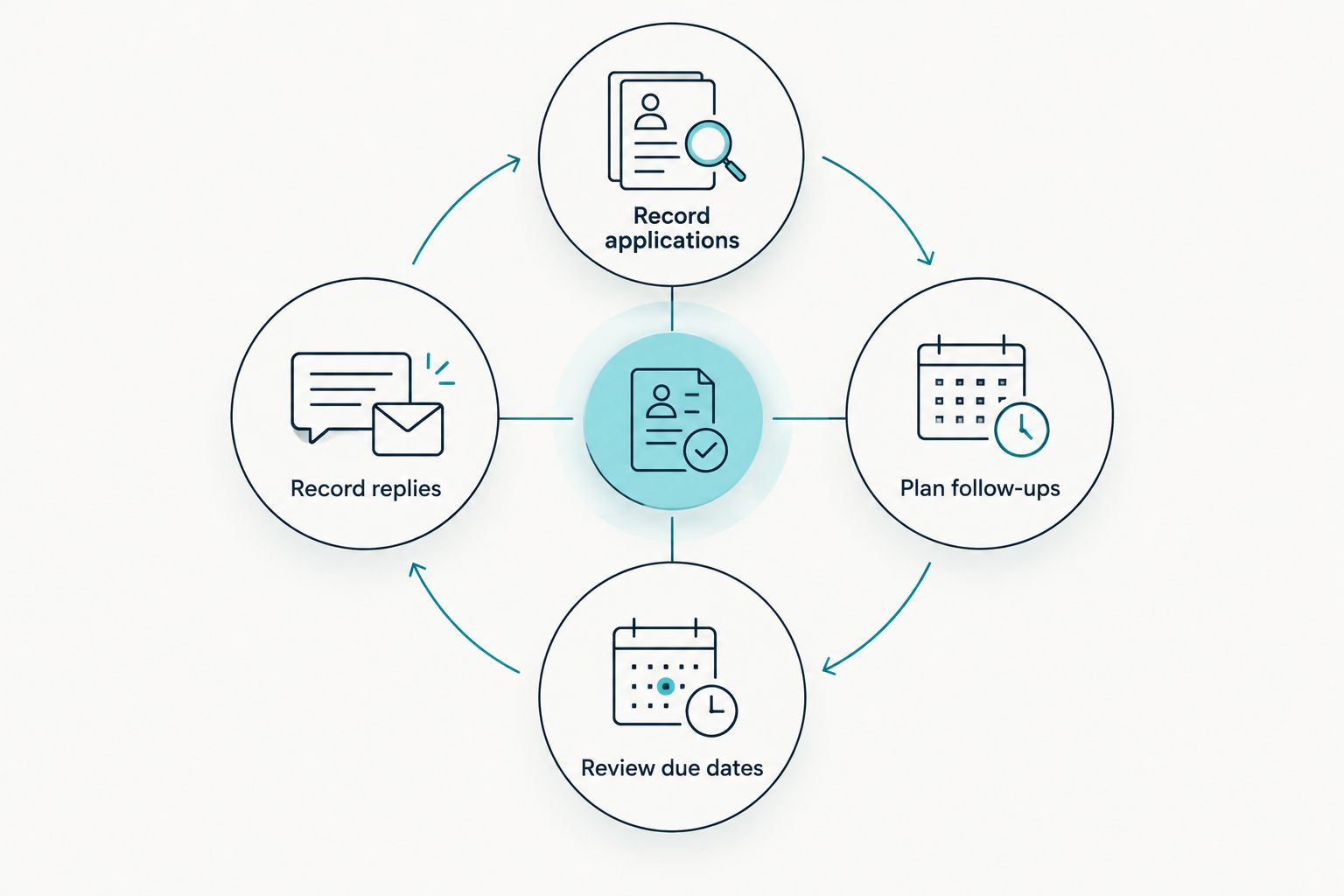
The full cycle is simple: Record applications, Plan follow-ups, Review due dates, Record replies. Repeat the cycle when something changes, rather than repeatedly emailing from an unchanged list.
Write the follow-up from the application record
Use the tracker to supply the facts, not to produce a long explanation. Name the vacancy, state when you applied and ask a question the recipient can answer. Do not attach identity documents or repeat your entire CV.
The following is an illustrative email, not a real client message or result:
Subject: Customer service application follow-up — CS-2026
Good day,
I submitted my application for the Customer Service Assistant position, reference CS-2026, on 6 October 2026. Please could you confirm whether recruitment for this role is still in progress?
I remain interested in the position and can provide further information if needed.
Kind regards, Nomsa
Replace every detail with information from your own application. If the employer supplied a name, address that person. If you cannot verify the reference, leave it out rather than inventing one.
Send a question, not a demand. Avoid asking why you have not been selected when you do not know whether selection is complete. Do not resend attachments unless the employer requests them or the recruitment instructions require them.
Reset the workflow after an employer update
A post-interview follow-up uses the same tracker, but a different starting point. The application date no longer determines the next action; the employer’s latest message does.
For example, an interviewer says the panel expects to decide by 23 October 2026. Record that date in Notes and set a review for after it. If the employer changes the timeline, replace the old reminder rather than adding another competing date.
Your next message can say:
Good day,
Thank you again for discussing the Customer Service Assistant role with me. You mentioned that a decision was expected by 23 October 2026. Please could you let me know whether there is an updated timeline?
Kind regards, Nomsa
This is an illustrative draft. Use it only when it matches what the employer actually said. If there was no promised date, do not write that there was one.
Best for applicants awaiting an interview outcome: keep the original application row and update its status, last contact and next review. Creating another row for the same application splits the history.
Choose the support you actually need
Blessingmdigital’s job-search resources address different tasks. Choose from the stated contents rather than assuming a larger download automatically includes a particular file format, integration or reminder feature.
| Resource | Best for | What the supplied description confirms | Limit |
|---|---|---|---|
| The South African CV & Job-Search System | Applicants wanting files across application stages | One download, retained files and a Start Here guide | You still need to supply accurate application details and act on employer instructions |
| Job Application Tracker + Follow-Up Messages | Applicants needing a list and follow-up prompts | A list for applications that shows when to message the employer again | A suggested date is not permission to ignore recruitment instructions |
| 8 Follow-Up Messages for Job Applications | Applicants mainly needing wording | Short messages for silence, interview invitations, rejection and offers | Message wording does not replace an application record |
Blessingmdigital’s Job Application Tracker + Follow-Up Messages is best for applicants who need an application list and follow-up prompts. The spreadsheet instructions above describe a tracker you build yourself; they do not claim that the purchased resource uses Google Sheets or sends email automatically.


Troubleshooting
- A date sorts in the wrong place. Check that the cell contains a recognised date rather than text. Apply Format, Number, Date, then re-enter the date if necessary.
- The company and role no longer match. A single column was sorted separately. Undo the sort and use a filter range covering the whole table before sorting again.
- You followed up twice. Check the sent folder before sending, record Last contact immediately and remove the completed reminder. A draft is not evidence that an email was sent.
- There is no contact address. Use the channel the advert or application portal provides. If it provides no enquiry route, record that limitation rather than guessing an employee’s address.
- A rejected application stays in the queue. Change Status, clear Next follow-up and check the status filter. Keep the historical row without keeping the chase active.
Customize your workflow
Add detail only when it changes your next action. A document-request column is useful if an employer asks for something specific; extra colour coding is not useful if you still cannot find the application reference.
Connect preparation to tracking. Before submission, use the Free Job Application Checklist, which contains 35 checks in a 4-page PDF. Then record the exact files sent, so a later follow-up refers to the application the employer received.
For your 2026 search, keep completed records separate from the active queue through filters rather than deleting them. Blessingmdigital’s job-search resources support the practical work of applying; keeping your information accurate and checking each employer’s instructions remains your responsibility.
FAQ
What should I put in a job application tracker?
Record the company, role, reference, submission date, status, contact details and next follow-up date. Add the CV version and employer instructions so you can check the facts before emailing.
When should I follow up on a job application in South Africa?
Follow the employer’s stated response window and contact instructions first. If no timing is given, choose a personal review date; the 7-calendar-day example in this guide is a planning rule, not a national hiring standard.
Can a job application tracker send emails automatically?
The workflow in this guide does not send emails automatically. You review the record and send the message yourself, which lets you check for replies and contact restrictions first.
Should I follow up before the vacancy closes?
Do not use a submission-based reminder to ignore a later closing date or a no-enquiries instruction. Check whether the employer permits enquiries and whether its stated response window has passed.
What do I do if the employer never replies?
Record the lack of response and continue applying for other suitable roles. Do not keep sending the same message simply because an old reminder remains in your tracker.
Can I use the same tracker after an interview?
Yes, update the existing application row after the interview. Record any promised decision date and base your next review on the latest employer communication.
Which Blessingmdigital resource fits application tracking?
Job Application Tracker + Follow-Up Messages fits applicants who need an application list and follow-up prompts. Its supplied description confirms a list that shows when to message the employer again; it does not establish automatic email sending.
One last thing
A blank follow-up date can be the correct result. If the employer prohibits enquiries or has closed the application, an accurate tracker should stop the reminder, not manufacture another task. Before planning your next email, ask whether there is a useful, permitted question to send.