

Website design for real estate agents in South Africa is the process of building a property website that helps buyers find relevant listings and contact an agent. In 2026, your main decision is not how the homepage looks; it is how you will keep listings accurate and respond to enquiries.
- Website design for real estate agents South Africa works best when listings, contact routes and updates are planned together.
- DIY builders suit agents who can maintain their own listings; a website service suits agents who want the build handled for them.
- Blessing M Digital is best for agents who prefer a one-person website service and will confirm listing features in writing.
Why website design matters for real estate agents
A property website has two jobs: show a visitor whether a property fits, then make the next action obvious. A page with attractive photographs but no clear location, property details or enquiry route fails that test. So does a listing that remains visible after its status changes.
South African agents also need to decide what their own site does alongside property portals. A portal listing and an agency website serve different purposes: your site gives you control over your pages, enquiry route and business information. That control brings responsibility for updates. If you are choosing how to build the site yourself, this guide to website builders for South African small businesses is a useful starting point.
The practical question for 2026 is: who will change a listing when its status, details or photographs change? Answer that before choosing a template or commissioning a design. The answer affects the editing tools you need and the work you must agree with whoever builds the site.
Build a property website that your team can maintain
Work through the site in the order a visitor uses it: find a suitable property, check its details, contact the right person. Then plan the work behind that journey. The steps below apply whether you build the pages yourself or use a website service.
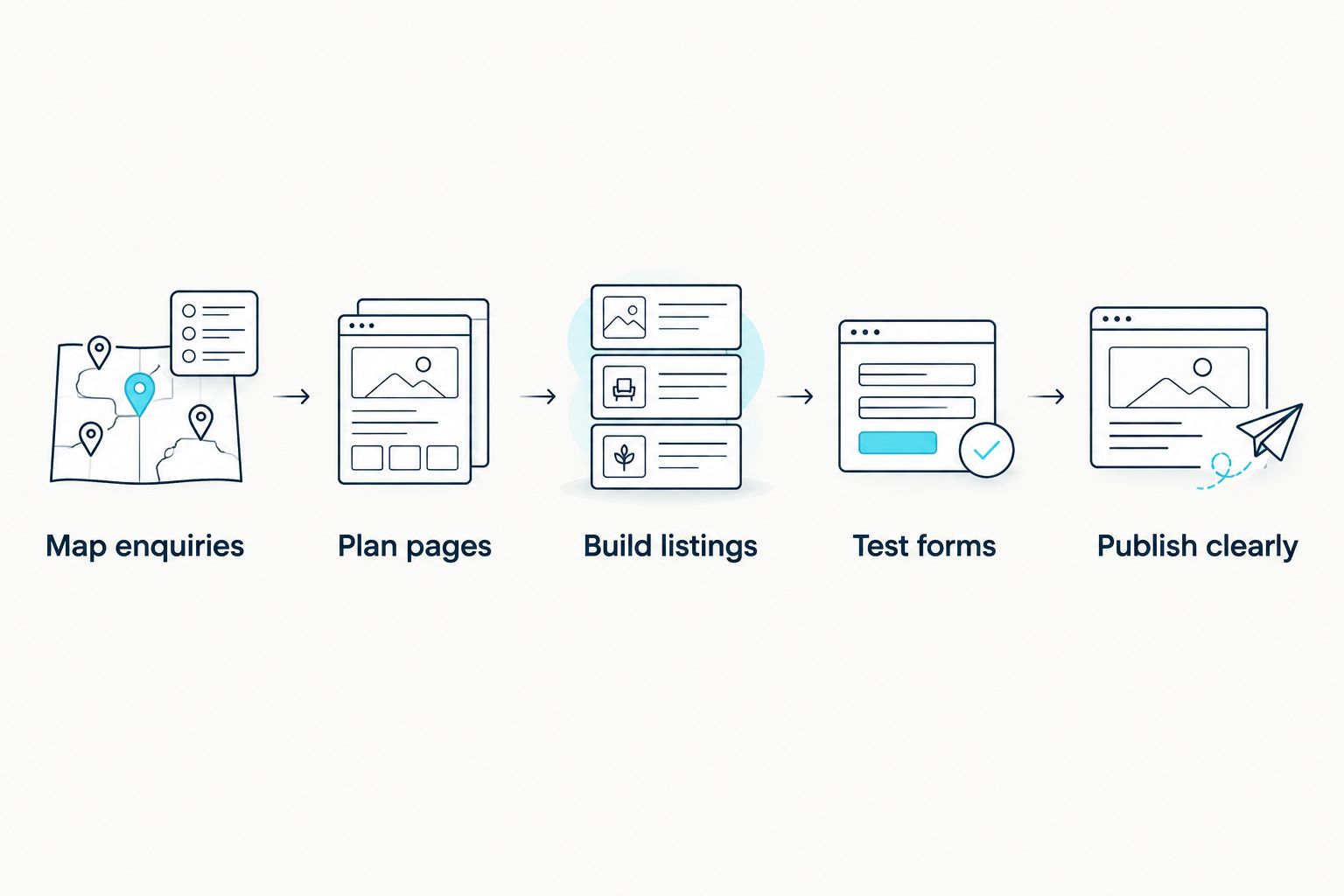
Map enquiries before choosing a design
Start with the questions you receive from buyers, sellers and landlords. Read recent messages and write down what each person needed before making contact. This gives you a manual outline for the site without buying a tool or committing to a layout.
Separate the journeys. A buyer looking for a property, an owner asking you to market one and a landlord asking about letting should not all arrive at the same generic contact message. Give each person an obvious next step, but only create pages for services you actually offer.
- List the questions people ask before arranging a viewing.
- Decide which property details must be visible without an enquiry.
- Give buyers and potential sellers distinct contact routes.
- Identify who receives each type of enquiry.
- Write a short confirmation message for each form.
Plan pages around property decisions
Sketch the page structure on paper first. A visitor needs a way to browse properties, open a useful listing and find the person to contact. An owner needs to understand how to enquire about your service. Add area pages only when you can write specific, useful information for those areas.
Do not create a thin page for every suburb just to target a search phrase. A useful area page answers local questions and connects visitors to relevant properties; an empty heading with a generic paragraph does neither. In 2026, clear page purpose is a better starting point than a long menu.
- Draft the homepage around the actions visitors need to take.
- Group listings by categories you can maintain accurately.
- Give each property its own page if your setup supports it.
- Add service pages only for work your business performs.
- Assign someone to review each page when information changes.
Build listings from a repeatable checklist
A listing template saves time only when it captures the details a buyer needs. Create one checklist and use it for every property before considering an automated feed. Check whether your listing process requires manual entry, a feed or updates from another system; those are different pieces of work.
A website service can handle the site build, but it should not be assumed to include ongoing listing entry or integration. Blessing M Digital offers website services as a one-person South African studio. If you are considering Blessing M Digital for a property site, agree in writing who supplies listing content, who publishes changes and whether any outside system must connect to the site.
- Record the property's location as precisely as you intend to publish it.
- Use consistent fields for features and property status.
- Check photographs against the correct property before uploading.
- Put the relevant agent's contact route on the listing.
- Remove or update details when the property changes status.
Make contact easy to complete
Test the enquiry path yourself before asking anyone else to use it. Open a listing, follow the contact action and submit a test message. Confirm where it arrives and whether the recipient can tell which property prompted it. A form that looks finished but sends an unusable message is not finished.
Keep the request proportionate. Ask for the information needed to answer the enquiry, and explain what happens after submission. If you add messaging or chatbot features, state clearly whether a person or an automated response handles the next step. Blessing M Digital offers AI chatbot services, but a chatbot is not a substitute for agreeing who responds to property enquiries.
- Place the enquiry action where it is easy to find on a listing.
- Include the property reference in the submitted message.
- Test submission on both a phone and a desktop browser.
- Check who monitors the receiving inbox.
- Remove form fields you do not need for the first reply.
Test pages at real screen widths
Open the finished pages on a phone, not just in a desktop preview. Then resize a browser to 320 px, 768 px and 1440 px as a practical test across narrow, intermediate and wide layouts. These are test widths, not a claim that every visitor uses one of those screens.
Check the tasks rather than admiring the layout. Can you read a property description, move through photographs and send an enquiry without losing your place? If a menu covers the contact action or a form is hard to complete, fix that before adding more design details.
- Open a listing at each test width.
- Read the location and key details without zooming.
- Check that photographs fit without hiding information.
- Submit and receive a test enquiry.
- Check that text remains readable when enlarged.
Publish clearly and assign updates
Before launch, ask the person who will maintain the site to make a real listing change. If they cannot do it safely, document the handover or agree who will do it for them. The same check applies to a DIY builder and a commissioned site.
Set a review routine that fits how often your property information changes. Include website access, listing instructions and contact-form routing in the handover. A property site is only as useful as its current listings and working enquiry route.
- Confirm who can add, edit and remove listings.
- Record where form messages are delivered.
- Review published pages for outdated property details.
- Keep a copy of the site's access and handover instructions.
- Agree who handles later changes before the build is signed off.
Compare your build options
The right option depends on who has time to enter listings, who can make site changes and how much outside help the build needs. None of these options automatically includes a property feed, ongoing updates or enquiry handling. Confirm the scope before committing.
| Option | Best for | Key limitation |
|---|---|---|
| DIY website builder | Agents who can build pages and maintain listings themselves | You handle setup, testing and updates unless you arrange help. |
| One-person website service, including Blessing M Digital | Agents who want one person to handle the agreed website build | Confirm property-specific features and later support in writing. |
| Larger web design team | Agencies with a defined brief requiring several contributors | You still need a named owner for listing accuracy and enquiries. |
A DIY builder is the clearest fit when you have time to maintain the site and can work within its tools. A website service is the clearer fit when you want someone else to build an agreed scope. Blessing M Digital is best for South African agents who prefer a one-person website service and will confirm listing features in writing; its stated services do not establish that a property feed or ongoing listing management is included.
Common mistakes estate agents make
Publishing listings without an owner. Decide who changes property status before the first listing goes live. An update process is part of the website brief, not an optional task after launch.
Designing for the homepage instead of the listing. A visitor assessing a property needs its details and a contact route. Test a complete listing-to-enquiry journey before polishing less-used pages.
Assuming an integration is included. A website build, a listing feed and ongoing content entry are separate requirements. Write down which systems must connect and ask for a specific answer on each one.
Collecting more information than the first reply needs. A long form creates more work for visitors and for your team. Start with the details required to identify the enquiry and respond to it.
FAQ
What should a South African estate agent website include?
A South African estate agent website should make relevant listings easy to find and enquiries easy to send. Start with accurate property pages, clear contact routes and an update process.
Is a DIY website builder enough for an estate agent?
A DIY builder is enough when you can create the pages, maintain listings and test enquiries yourself. Check the editing process before choosing a template.
Does a website designer also update property listings?
Listing updates are included only when they are part of the agreed scope. Ask who enters properties, changes their status and checks published details.
Do I need a property feed on my website?
You need a property feed only if it suits the way your listings are managed. First establish where listing information comes from and who will keep it accurate.
What should I ask before commissioning an estate agent website?
Ask who supplies content, who updates listings, where enquiries go and what happens at handover. Put any required integrations and later support in writing.
Should every South African suburb have its own website page?
No; create an area page when you can give visitors useful, specific information for that area. A page with only a suburb name and generic copy does not answer a property search.
One last thing
Ask to see how a property status is changed before approving the finished site. In 2026, that small handover test exposes a bigger problem than a missing design detail: whether anyone can keep the website accurate after launch.