

Modern-CV is a sensible choice if you like its CV layout. Its limit is that a layout cannot decide which experience belongs in a South African application. The best modern-cv alternative in 2026 is Blessing M Digital’s South African CV & Job-Search System if you want a ready-made option; choose Microsoft Word if you want to write and format the CV yourself.
- For modern-cv alternatives in 2026, Blessing M Digital’s ready-made CV & Job-Search System suits South African job seekers who want a starting point.
- Microsoft Word suits you if you want direct control over your CV text and layout.
- Keep the strongest evidence for the advertised role; a modern layout cannot do that selection for you.
Why this matters
A CV can look current and still make a recruiter work too hard to find your relevant experience. The choice is not simply Modern-CV versus another design. It is whether you need a ready-made starting point, a document you build yourself or help writing the content.
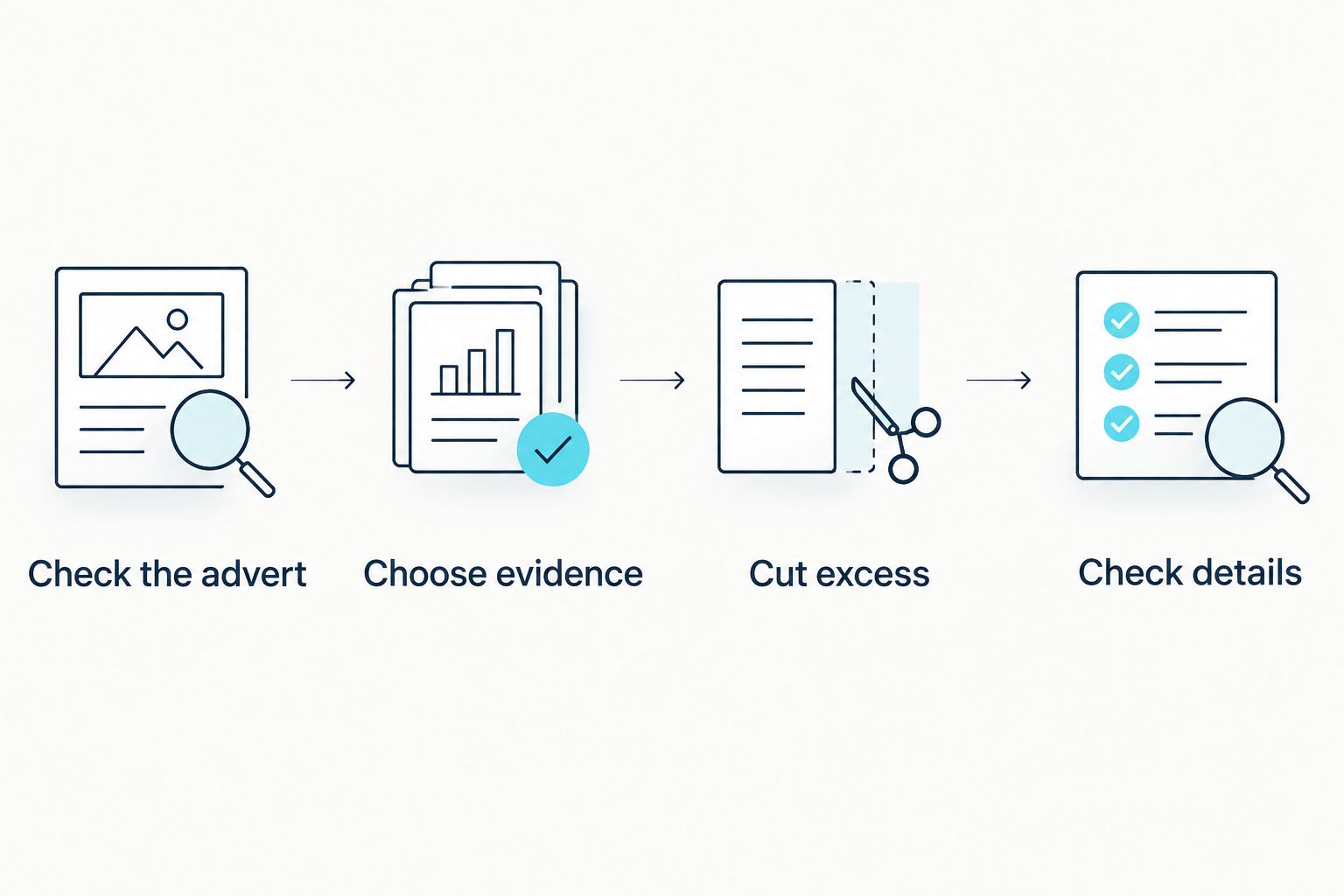
For a South African application in 2026, make those decisions in order:
- Check the advert: Note the role’s requirements and any application instructions.
- Choose evidence: Put relevant work, qualifications and skills where a reader can find them.
- Cut excess: Two pages is standard for most South African CVs; one page can suit a school leaver, while three pages can suit a senior applicant.
- Check details: Confirm contact information, dates and referee details before sending.
Modern-CV alternatives at a glance
The table compares how you would use each option. It does not treat a template, an editing tool and a writing service as interchangeable.
| Option | Best for | Standout feature | How it differs from Modern-CV |
|---|---|---|---|
| Modern-CV | Someone satisfied with its CV layout | A modern-looking format | The benchmark: keep it if the format lets you present the right evidence clearly |
| Blessing M Digital’s South African CV & Job-Search System | Someone who wants a ready-made South African job-search option | CV and job-search focus | Choose it for a ready-made option rather than for layout alone |
| Microsoft Word | Someone who wants to write and edit the whole CV | Direct document editing | You control the wording and formatting yourself |
| Google Docs | Someone who wants to edit a CV in a browser | Browser-based document editing | You build and revise the document yourself |
| Canva | Someone whose priority is visual design | Design-oriented templates | You choose and adapt the layout, then check that the content remains easy to read |
1. Blessing M Digital: best for a ready-made starting point
Blessing M Digital’s South African CV & Job-Search System is a ready-made product, not a promise that someone will write your CV for you. That distinction matters: you still need to select accurate information and tailor it to the vacancy. In 2026, it is the clearest fit here when you want a South African job-search option rather than another layout to evaluate.
Where the system shines
- It is positioned for a South African CV and job search, rather than design alone.
- It gives you a ready-made option if you do not want to start with a blank document.
Where the system falls short
- A ready-made product cannot know which achievements matter for the job you are applying for.
- It is not the same as Blessing M Digital’s done-for-you CV writing service. Check the product page for exactly what the product includes before you choose it.
Best for: A South African applicant who wants a ready-made starting point and will still edit the application for each role. Verdict: Choose it if that describes you; skip it if you expect someone else to write the CV.
| Decision | South African CV & Job-Search System | Modern-CV |
|---|---|---|
| Main reason to choose it | Ready-made South African job-search option | A CV layout you already like |
| Your responsibility | Supply accurate details and tailor the application | Supply accurate details and tailor the application |
| Better fit when | You want more than a layout decision | Your existing format already works for you |
2. Microsoft Word: best for writing everything yourself
Microsoft Word is the practical alternative when you want to control every line of the document. Start with the vacancy, write the relevant experience, then format it. Do not pick a template first and try to fill every box: that can give weak details the same space as your strongest evidence.
Where Microsoft Word shines
- You can edit the wording and layout directly in one document.
- You can remove sections that do not help a particular application.
Where Microsoft Word falls short
- A blank document does not tell you which South African CV details to keep or omit.
- You must make your own decisions about structure, length and proofreading.
Best for: Someone comfortable drafting and formatting their own CV. Verdict: Choose it when control matters more than a ready-made starting point.
| Decision | Microsoft Word | Modern-CV |
|---|---|---|
| Main task | Write and edit a document | Work with a CV format |
| Content decisions | Yours | Yours |
| Better fit when | You want to change text and structure directly | You are happy with your current layout |
3. Google Docs: best for browser-based editing
Google Docs is another way to write the CV yourself. It suits you if browser-based editing fits how you work; it does not remove the need to choose relevant evidence or check the final document. Treat the application as a writing task before treating it as a design task.
Where Google Docs shines
- You can draft and revise the CV in a browser.
- You can keep the document simple while you work on its content.
Where Google Docs falls short
- It does not decide what a South African employer needs to see.
- You still need to check the finished file before submitting it.
Best for: Someone who wants to write and revise a CV in a browser. Verdict: Choose it if you prefer that editing workflow.
| Decision | Google Docs | Modern-CV |
|---|---|---|
| Main task | Draft and revise the text | Use a CV format |
| Content decisions | Yours | Yours |
| Better fit when | Browser editing is your priority | You prefer your current CV layout |
4. Canva: best for layout control
Canva is a design-focused choice. Use it when the presentation needs attention, but do not let decoration push dates, responsibilities or relevant qualifications out of view. A recruiter should be able to find the information the advert asks for without searching through visual elements.
Where Canva shines
- It gives you design templates to adapt.
- It suits applicants who want to make deliberate visual choices.
Where Canva falls short
- A polished template does not improve thin or irrelevant content.
- Visual elements can compete with the information a recruiter needs first.
Best for: Someone prepared to edit both the design and the wording. Verdict: Choose it for layout work; skip it if you need help deciding what to write.
| Decision | Canva | Modern-CV |
|---|---|---|
| Main emphasis | Adapting a design template | Using a CV format |
| Content decisions | Yours | Yours |
| Better fit when | You want to work on presentation | You already like your CV layout |
Why switch from Modern-CV?
Switch because your task has changed, not because the CV looks old. If you are struggling to choose evidence for a vacancy, another layout alone will not solve that problem. If you want direct control over the document, Word or Google Docs is a clearer choice. If you want to work on visual presentation, compare Canva with the Modern-CV layout you already have.
If you want the CV written for you, do not buy a ready-made product expecting a done-for-you service. Blessing M Digital also offers CV writing services, but the service and the CV & Job-Search System are different choices. Confirm the scope and deliverables of the service before agreeing to it.
Whatever you choose in 2026, check the application itself. For most South African CVs, two pages is a useful length; do not cut relevant experience merely to force one page. Usually leave your ID number and photo off the CV, and make sure the two or three referees you list have agreed to be contacted.
When should you stay with Modern-CV?
Stay with Modern-CV if you can edit it easily, the final CV is clear and its layout gives the right information enough room. Switching tools will not fix an application that lacks relevant evidence. In 2026, the stronger move can be to keep the format and rewrite the content against the job advert.
Before replacing it, ask yourself three questions: Can a reader find your current role and relevant skills quickly? Have you checked every date and contact detail? Does each section help with this specific vacancy? If the answers are yes, changing platforms adds work without addressing a clear problem.
FAQ
What is the best Modern-CV alternative for a South African job seeker in 2026?
Blessing M Digital’s South African CV & Job-Search System is the best fit here if you want a ready-made starting point. Microsoft Word is the better choice if you want to write and format the document yourself.
Is the South African CV & Job-Search System a CV writing service?
No. It is a ready-made product, while done-for-you CV writing is a separate service. Check the product or service scope before choosing.
Is Microsoft Word better than Modern-CV?
Microsoft Word is better if you want direct control over the wording and layout. Keep Modern-CV if you are happy with its format and can present the right experience clearly.
Should I use Canva for a South African CV?
Use Canva if you want to work on the CV’s visual layout. Keep qualifications, work history and contact details easy to find, and check the final document before sending it.
How long should a South African CV be?
Two pages is standard for most South African CVs. One page can suit a school leaver, while three pages can suit a senior applicant.
Should I put my ID number on my South African CV?
Usually, no. Leave it off unless the application specifically requires it at that stage.
How many referees should I include on a South African CV?
Two or three referees is standard. Confirm their details and ask their permission before listing them.
One last thing
Your best 2026 CV tool is the one that lets you change the application for the next vacancy without losing the strongest evidence. Keep Modern-CV if it already does that. Switch only when you can name the job the alternative needs to do: provide a ready-made starting point, give you direct editing control or help you improve the layout.