

CV Genius gives you a guided way to build a CV, which helps when a blank page is the problem. Its prompts cannot decide which details belong on your South African CV or whether you want to write it yourself. The best CV Genius alternative in 2026 is Blessing M Digital if you want a South African-focused, ready-made job-search product; Google Docs is the better choice if you want to draft your CV from scratch.
- Blessing M Digital is the best CV Genius alternative here for a South African-focused, ready-made job-search product.
- Google Docs suits job seekers who want to write and revise their own CV.
- Microsoft Word suits people who prefer a conventional editable document; Canva suits visual layout work.
- Choose a CV format your recruiter can read easily, then check every personal detail before sending it.
Why this matters
A CV builder can help you get words onto a page. It cannot make every application decision for you. In South Africa, those decisions include how long your CV should be, whether to include an ID number, and which referees to list. Pick the route that addresses the part you are stuck on: drafting, editing, layout or deciding what to include.
CV Genius alternatives at a glance
| Option | Best for | Standout feature | How it differs from CV Genius |
|---|---|---|---|
| CV Genius | Job seekers who want guided CV creation | Step-by-step builder | The benchmark: it guides drafting rather than starting with a blank document |
| Blessing M Digital | South African job seekers who want a ready-made job-search product | South African CV & Job-Search System | A ready-made product, not the same choice as an interactive CV builder |
| Google Docs | People who want to write and revise their own CV | Editable online document | You control the content without following a builder's prompts |
| Microsoft Word | People who prefer a conventional document editor | Familiar document editing | You draft and format the CV yourself |
| Canva | People who want to control the visual layout | Design-led templates and editing | You choose and adjust the layout rather than follow a CV-building sequence |
These are different ways of doing the work, not interchangeable products. In 2026, start by deciding who will write the CV and how much guidance you need. Then check whether the finished document presents your experience clearly.
1. Blessing M Digital: best for South African job-search support
Blessing M Digital offers a ready-made South African CV & Job-Search System. It also offers CV writing as a service; that is a separate, done-for-you route, not another name for the ready-made product. Choose between them based on whether you want to use a product yourself or ask someone to work on your CV.
Where it shines
- The ready-made product is explicitly for a South African CV and job search.
- The separate CV-writing service gives you a different route if you do not want to handle the writing alone.
- The studio's published CV guidance addresses practical local questions, including CV length, ID numbers and referees.
Where it falls short
- A ready-made job-search product is not a substitute for a guided, interactive builder if that is the tool you want.
- The product and the CV-writing service serve different needs. Check the stated scope before choosing either one.
| Decision | South African CV & Job-Search System | CV Genius |
|---|---|---|
| Primary route | Ready-made product | Guided CV builder |
| Writing the CV | Check the product's stated contents before buying | Work through builder prompts |
| South African decisions | Choose it for its South African focus | Check local CV decisions yourself |
Best for: A South African job seeker who wants a ready-made product rather than a blank document or an interactive builder. Verdict: Choose the product if its stated contents match the help you need; use the separate service route if you need someone to work on the CV for you.
2. Google Docs: best for writing your own CV
Google Docs is an online document editor. It makes sense if you already know what to say and want to draft, revise and share a document. You remain responsible for every content and layout decision.
Where Google Docs shines
- You can edit your wording directly, rather than answer a builder's sequence of questions.
- You can revise a document for a particular application without rebuilding it from the start.
Where Google Docs falls short
- An editor does not tell you which experience matters most for a specific vacancy.
- You must check the final layout and exported file yourself.
| Decision | Google Docs | CV Genius |
|---|---|---|
| Starting point | Document | Guided builder |
| Content choices | You make them directly | Prompts structure the drafting process |
| Final check | You review the document and export | You review the builder's output |
Best for: Someone comfortable drafting their own CV. Verdict: Choose Google Docs when editing control matters more than guided prompts.
3. Microsoft Word: best for a conventional editable CV
Microsoft Word is another route for writing a CV as a document. Choose it if you already work comfortably in Word or need to edit an existing Word file. A familiar editor saves little effort, though, if you are still unsure what belongs in the CV.
Where Microsoft Word shines
- You can edit the wording and formatting in the document itself.
- You can keep a working copy and tailor it to each role.
Where Microsoft Word falls short
- Word does not decide which achievements are relevant to a vacancy.
- Formatting changes can distract from the harder task: making your experience easy to scan.
| Decision | Microsoft Word | CV Genius |
|---|---|---|
| Main workflow | Edit a document | Follow builder prompts |
| Content selection | Your responsibility | Your responsibility, with prompts |
| Layout review | Check your finished file | Check the generated CV |
Best for: A job seeker who wants to maintain and tailor an editable document. Verdict: Choose Word if you know what to write; choose a guided route if the content is the obstacle.
4. Canva: best for controlling the visual layout
Canva is a design editor with CV templates. It gives you direct control over how a CV looks, but visual control is not the same as a stronger application. Keep the information readable before spending time on design.
Where Canva shines
- You can choose and adjust a visual layout.
- It is useful when presentation is a deliberate part of the application.
Where Canva falls short
- A template cannot choose the right experience or referee for you.
- A design-led layout needs a careful readability check after editing.
| Decision | Canva | CV Genius |
|---|---|---|
| Main workflow | Edit a visual template | Follow builder prompts |
| First priority | Layout choices | Structured drafting |
| Final check | Readability and content | Readability and content |
Best for: Someone who has their CV content ready and wants to work on its layout. Verdict: Choose Canva for layout control, not as a shortcut around writing.
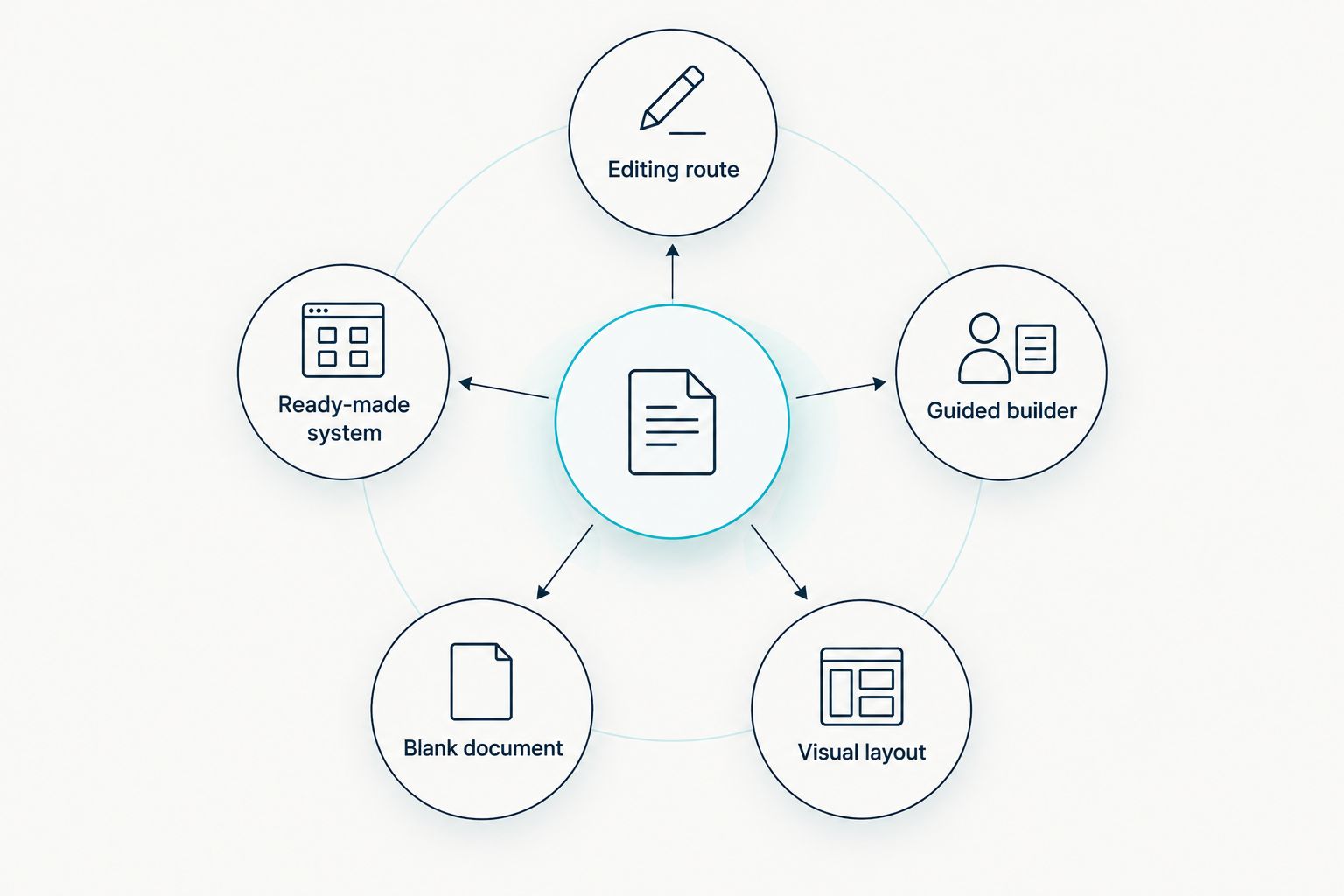
Choose by the work you need to do
The useful comparison is not which option has the most features. It is which one removes your actual obstacle. Use these routes in 2026:
- Ready-made system: You want a South African-focused product to use yourself. Check what the product includes before choosing it.
- Guided builder: You want prompts to help you draft. CV Genius is the benchmark here.
- Blank document: You can write your own content and want direct editing control. Use Google Docs or Microsoft Word.
- Visual layout: Your content is ready and you want to adjust its presentation. Consider Canva, then check readability.
Once you have chosen a route, test it against the CV you need to send. For most South African CVs, 2 pages is the standard in the studio's published guidance; 1 page suits school leavers, while 3 pages can suit senior roles. Do not stretch a short work history to fill space or cut relevant experience just to match a template.
Check personal information next. The studio's guidance says an ID number usually does not belong on a South African CV. It also describes 2 or 3 referees as standard. Ask your referees before listing them, and make sure their details are current. No builder, document editor or template can make those checks on your behalf.
Check the South African CV system
See what the ready-made product includes before deciding whether it fits your job search.
Why people switch from CV Genius
People compare CV Genius alternatives when guided drafting is not the part they need help with. A builder is useful for structuring an initial CV; a document editor gives you more direct control over revisions, while a ready-made South African product addresses a different need. That is a choice of workflow, not evidence that CV Genius does something wrong.
Make the switch for a specific reason. If you already have accurate content, move it into an editor and tailor it to each vacancy. If you need to settle South African CV questions, check local guidance before choosing any template. If you want someone else to work on your CV, look at the scope of a CV-writing service rather than assuming a self-serve product includes that work.
When staying with CV Genius makes sense
Stay with CV Genius if its guided drafting process helps you finish a CV you would otherwise leave blank. Switching editors will not improve an unfinished application. In 2026, the better move is to finish the draft, check the details against the vacancy, and review the final document before sending it.
FAQ
What is the best CV Genius alternative for a South African job seeker?
Blessing M Digital is the best fit here if you want a ready-made South African CV and job-search product. Google Docs is the better fit if you want to write and edit your CV from scratch.
Is Google Docs better than CV Genius for a CV?
Google Docs is better when you want direct control over writing and editing. CV Genius suits you when guided prompts help you get a draft started.
Is a ready-made CV product the same as a CV-writing service?
No. A ready-made product is something you use yourself; a CV-writing service involves someone working on your CV. Check the stated scope of each before choosing.
How long should a South African CV be in 2026?
Two pages is standard for most South African CVs in Blessing M Digital's published guidance. One page can suit a school leaver, while three pages can suit a senior role.
Should I put my ID number on a South African CV?
Usually no. Leave your ID number off a CV you circulate to employers unless there is a specific reason to provide it through an appropriate application process.
How many referees should I put on a South African CV?
Two or three referees is standard in the studio's published guidance. Ask each person first and check that their contact details are current.
One last thing
In 2026, do not choose a CV tool by its template before you have checked the job advert. Write down the role's requirements, then make sure your CV shows the matching experience clearly. The best-looking CV in this comparison still fails its basic job if a reader cannot find the relevant facts.