

Best overall: Meta Business Suite for a South African small business posting to Facebook and Instagram. Best for customer conversations: WhatsApp Business. Best for graphics: Canva. The best social media tools for South African small businesses in 2026 depend on whether your immediate job is publishing, replying, designing or reaching business buyers.
- Meta Business Suite is the best overall social media tool for South African small businesses using Facebook and Instagram.
- Use WhatsApp Business for customer enquiries, Canva for graphics and Buffer when scheduling across networks becomes the bottleneck.
- LinkedIn's own scheduling suits businesses posting mainly for professional audiences.
- Choose one publishing routine before adding another tool; tools do not decide what your customers need to hear.
Why this matters
A tool should remove a specific task from your week. If you miss posts because nobody prepares them, start with a scheduling routine. If enquiries get lost, fix how you handle messages before adding another content platform.
Blessing M Digital is a creative and digital studio serving South African businesses, creators and professionals. It is not a social media scheduling product. Keep that distinction clear when deciding whether you need a tool to operate yourself or creative work such as branding and video production.
For 2026, write down the channels where customers contact you, who replies and who approves posts. A salon answering appointment questions on WhatsApp has a different problem from a business selling services to other companies on LinkedIn. Buying into a larger workflow before identifying that problem adds admin rather than removing it.
What makes the best social media tool for your business?
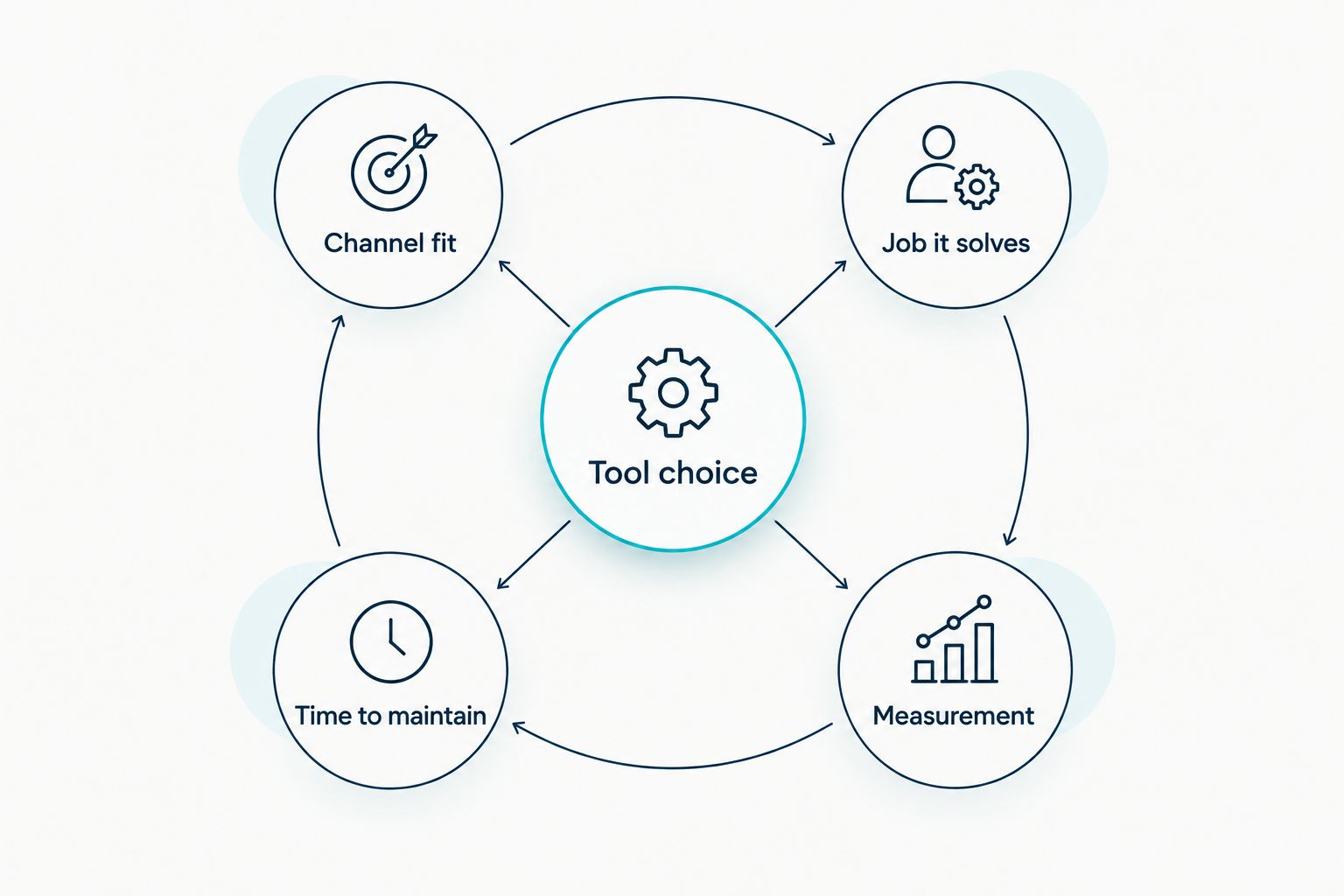
Use these criteria before comparing features:
- Channel fit: Choose a tool that works with the channels you already use. Do not open another account solely because a tool supports it.
- The job it solves: Separate publishing, customer replies and design. An image editor does not manage enquiries; a messaging app does not plan your feed.
- Time to maintain: Check whether the person responsible can prepare, approve and publish content without creating a second job.
- Handovers: If someone else helps with content, establish who can edit a post, publish it and answer a customer.
- Measurement: Look at the signals relevant to your goal, such as enquiries or visits to a contact page, rather than treating every reaction as a sale.
Start with the task that causes the most missed opportunities. For a local business receiving unanswered questions, that is the reply process. For a business with content ready but irregular posting, it is publishing.
Best social media tools at a glance
These options do different jobs. The ranking puts the most useful publishing starting point first, then separates customer conversations, design, broader scheduling and professional-audience posting.
| Tool | Best for | Standout function | Key limitation |
|---|---|---|---|
| Meta Business Suite | Facebook and Instagram publishing | Managing posts across Meta's platforms | Does not cover your full cross-platform workflow |
| WhatsApp Business | Customer conversations | Organising and responding to messages | Not a feed-planning tool |
| Canva | Preparing social graphics | Reusable design layouts | Does not replace a posting strategy |
| Buffer | Scheduling across networks | A shared publishing queue | Adds a separate workflow to maintain |
| LinkedIn scheduling | Professional-audience posts | Scheduling within LinkedIn | Does not manage other channels |
1. Meta Business Suite: best for Facebook and Instagram publishing
Meta Business Suite is the clearest default when Facebook and Instagram are your main publishing channels. Prepare posts around what customers actually ask, then use the tool to keep those channels moving. A shared publishing place is useful; it does not remove the need to check comments and messages.
For example, a South African service business can prepare a post answering a common booking question and adapt its wording for each channel. Do not copy a graphic across both accounts without checking whether the text and format still make sense.
Meta Business Suite pros:
- Keeps Facebook and Instagram publishing together.
- Gives a small team one place to plan Meta posts.
- Fits businesses already active on those channels.
Meta Business Suite cons:
- It will not run your LinkedIn or WhatsApp communication.
- Scheduled content still needs a person to handle replies and corrections.
Best for: A small business whose regular social posts go to Facebook and Instagram. Verdict: Use Meta Business Suite as your publishing base if those are your primary channels; otherwise, skip it as your main tool.
2. WhatsApp Business: best for customer conversations
WhatsApp Business serves a different purpose: handling messages from people who want an answer. Its business features include message organisation and quick replies. Those are useful when the same questions arrive repeatedly, but a saved answer must still match the customer's actual question.
A business taking enquiries can draft clear replies for opening hours, how to request a quotation and what information to send. Check each reply before using it. Do not ask customers to send sensitive information simply because a message template makes the request easy.
WhatsApp Business pros:
- Keeps customer conversations central to the workflow.
- Helps organise enquiries and repeated questions.
- Suits businesses that convert interest through direct contact.
WhatsApp Business cons:
- It does not plan a Facebook, Instagram or LinkedIn content calendar.
- Reusable replies become unhelpful when they are sent without context.
Best for: Businesses that receive and manage customer enquiries through WhatsApp. Verdict: Use WhatsApp Business for replies, not as a replacement for a publishing tool.
3. Canva: best for preparing social graphics
Canva helps you make graphics for posts, notices and simple visual explainers. It is the design choice in this list, not the answer to where or when you should publish. Start by making layouts for content you repeat, rather than producing a new design for every post.
A local business might need a service explainer and a notice about a change to its usual hours. Check the wording, contact details and readability on a phone before publishing. A polished graphic with outdated information still creates extra customer questions.
Canva pros:
- Helps keep repeated post types visually consistent.
- Works well for text-led notices and explainers.
- Lets you prepare graphics before scheduling them elsewhere.
Canva cons:
- A template cannot decide which customer question to answer.
- Easy-to-make graphics can encourage posting without a clear purpose.
Best for: An owner or team member preparing their own social graphics. Verdict: Use Canva when design preparation slows you down; skip extra templates if you already have usable visuals.
4. Buffer: best for scheduling across networks
Buffer is a publishing option when maintaining separate channel workflows becomes difficult. A shared queue helps organise planned posts, but check each network's final version before it goes out. The same caption does not always suit every audience.
Before moving your routine, list the accounts you actively maintain and the content each one needs. If your business only publishes on Facebook and Instagram, first decide whether Meta Business Suite already covers the work. Adding Buffer without a cross-network need creates another place to check.
Buffer pros:
- Puts planned content for different networks into one workflow.
- Makes upcoming posts easier to review together.
- Fits an owner who prepares content in batches.
Buffer cons:
- It adds another tool to maintain.
- A shared queue does not make identical posts appropriate everywhere.
Best for: A business with an active publishing routine across multiple networks. Verdict: Use Buffer when separate schedules are the problem; hold off if one channel group covers your work.
5. LinkedIn scheduling: best for professional-audience posts
LinkedIn's own scheduling keeps planned posts on the platform where you publish them. It is a focused choice for a business speaking to professional buyers, partners or potential hires. It is less useful when customer conversations mainly happen on Facebook, Instagram or WhatsApp.
A South African business selling services to other businesses can use posts to explain a process or answer a buyer's question. Check the final post yourself and return to respond to comments. Scheduling makes publication predictable; it does not create a conversation on its own.
LinkedIn scheduling pros:
- Keeps LinkedIn posts in their publishing platform.
- Fits a focused professional-audience routine.
- Avoids adding a separate scheduler solely for LinkedIn posts.
LinkedIn scheduling cons:
- It does not coordinate your other social channels.
- It offers little value if your intended customers are not on LinkedIn.
Best for: A business whose social content mainly addresses professional buyers. Verdict: Use LinkedIn scheduling for a LinkedIn-led routine; skip it as your main system when customers contact you elsewhere.
How to put the tools to work in 2026
Choose one publishing tool, then add a separate tool only when it has a separate job. A practical 2026 test is to plan 2 posts per week for 4 weeks around real customer questions. This is a planning exercise, not a promised growth result. Review which posts prompt useful conversations, and change the topics before changing the software.
Use this order:
- Pick the channel: Start where you already receive relevant questions or enquiries.
- Assign the job: Name who drafts, checks, publishes and replies. One person can hold every role, but the work still needs an owner.
- Prepare the answer: Write the useful point first. Make the graphic only if it helps explain that point.
- Check the result: Look for relevant replies and enquiries, not just whether a post went live.
Do not schedule a month of posts about services you have not explained clearly. Fix the message first. If preparing consistent visuals or video is the sticking point, distinguish that creative work from a scheduling subscription: Blessing M Digital offers branding and video production services, while the tools above help you operate your own channels.
How these tools were ranked
The ranking follows the criteria above: channel fit, the task removed, maintenance, handovers and measurement. Meta Business Suite comes first because it is the most direct publishing choice for a business centred on Facebook and Instagram. WhatsApp Business and Canva rank for different jobs, not because they are interchangeable schedulers.
This is a decision guide, not a claim that every South African small business needs all 5 tools. In 2026, the right choice is the smallest setup that supports the channels and tasks you actually maintain.
Which social media tool should you choose?
Choose Meta Business Suite if Facebook and Instagram carry your regular posts. Add WhatsApp Business when handling enquiries is a separate daily task, or Canva when preparing graphics slows publication. Choose Buffer instead of piling up separate scheduling routines when several active networks genuinely need planning.
If LinkedIn is your main professional channel, start with LinkedIn scheduling. Blessing M Digital is a service option for creative work, not a sixth scheduling app. Decide whether the gap is content production or day-to-day publishing before asking anyone to take over the work.
FAQ
What is the best social media tool for a South African small business in 2026?
Meta Business Suite is the best starting point if your business mainly publishes on Facebook and Instagram. Choose a different tool when your main task is customer messaging, graphic design or publishing across other networks.
Is WhatsApp Business better than Meta Business Suite?
WhatsApp Business is better for managing direct customer conversations; Meta Business Suite is better for planning Facebook and Instagram posts. Use the one that matches the task you need to fix.
Should a small business use Canva and a scheduling tool?
Use both only if you need help with both graphics and publishing. Canva prepares visuals, while a scheduling tool organises when posts go live.
When should I choose Buffer instead of Meta Business Suite?
Choose Buffer when you actively plan content across multiple networks and separate publishing routines are slowing you down. If you mainly post to Facebook and Instagram, assess Meta Business Suite first.
Is LinkedIn scheduling useful for a local South African business?
LinkedIn scheduling is useful when the business regularly posts for professional buyers or partners. It is not the main tool for a business whose enquiries arrive through other channels.
Can Blessing M Digital manage my social media scheduling?
The supplied service description does not list social media scheduling as a service. Blessing M Digital does list branding and video production; define the deliverables you need before treating creative work and tool operation as the same job.
One last thing
Before you replace a tool in 2026, check whether anyone owns the replies. A scheduled post can bring in a relevant question, but your publishing software will not decide how your business answers it. Put the reply responsibility in writing alongside your posting plan.