

Best overall: MailerLite for a straightforward small-business newsletter. Best for marketing and transactional email in one platform: Brevo; best for a business already using Zoho CRM: Zoho Campaigns. Blessing M Digital is the service option for South African businesses that want help with email marketing rather than another tool to manage alone.
- MailerLite is the best email marketing tool for South African small businesses starting a regular newsletter.
- Choose Brevo when marketing emails and transactional messages need to work together.
- Choose Zoho Campaigns if your customer records already live in Zoho CRM.
- Blessing M Digital offers email marketing services; it is not an email marketing platform.
Why this matters
The wrong tool creates work before you send a useful email. A small business needs a way to collect permission, keep its contact list accurate, send readable messages and see what happened after each campaign. Extra features do not help if nobody has time to use them.
In South Africa, your choice also has to fit how you handle personal information under the Protection of Personal Information Act, or POPIA. Software features do not make a contact list compliant by themselves. Record how people joined, explain what you will send, provide an unsubscribe route and check the rules that apply to your business before importing contacts.
If you need someone to handle the work rather than select software alone, Blessing M Digital offers email marketing as a service. The tool comparison below is for choosing a platform; it is not a ranking of agencies.
What makes the best email marketing tool for a small business?
Use these criteria before comparing brand names:
- Permission and list control: You need a clear way to manage contacts, consent records and unsubscribes. Check what your chosen platform records and what you must document separately.
- Ease of sending: You should be able to build, preview and schedule an email without rebuilding it each time.
- Useful segmentation: You need to separate relevant groups, such as existing customers and people who requested updates, without sending every message to everyone.
- The right connections: Check whether the platform works with your actual website, forms, shop or customer database. Do not choose it because an integration exists for software you do not use.
- Reporting you will act on: Delivery problems, unsubscribes and link activity should tell you what to fix. A dashboard is not a strategy.
- Manageable handover: Another authorised person should be able to understand how the list, templates and sending process work.
For a South African small business in 2026, permission and fit with your existing systems matter more than a long feature list. If your team cannot explain where a contact came from, pause before sending them a campaign.
Best email marketing tools at a glance
| Tool | Best for | Standout feature | Key limitation |
|---|---|---|---|
| MailerLite | A straightforward newsletter | Email creation and subscriber management in one place | Less suitable if transactional email is central to the brief |
| Brevo | Marketing plus transactional messages | Both types of email in one platform | More setup to understand if you only send a newsletter |
| Zoho Campaigns | Businesses using Zoho CRM | Connection to an existing Zoho workflow | Less compelling when you do not use Zoho CRM |
| Mailchimp | Teams prioritising campaign templates | Template-led campaign building | Review the full workflow before committing to it |
The order answers different needs; it does not mean every business should migrate to MailerLite. Start with what your emails must do, then check each shortlisted platform against a real campaign.
1. MailerLite: best email marketing tool for a regular newsletter
MailerLite is the default pick if you want to collect subscribers and send useful updates without making your email programme more complicated than it needs to be. A service business, for example, can use a newsletter to share relevant advice with people who asked to receive it. Build the message around a clear reader question rather than a list of everything the business offers.
MailerLite pros:
- Focuses the selection on newsletter work instead of a wider customer-management project.
- Supports a repeatable process for building campaigns and managing subscribers.
- Fits a team that needs to establish an email routine before adding complex workflows.
MailerLite cons:
- It is not the clearest pick when transactional messages are a central requirement.
- You still need to check how your own forms, contact records and consent process fit together.
Best for: A small business starting or simplifying a permission-based newsletter.
Verdict: Buy MailerLite for the newsletter use case; do not choose it solely because another business uses it.
2. Brevo: best for marketing and transactional email
Brevo is the stronger fit when you need to consider promotional campaigns alongside messages triggered by customer activity. Those are different jobs: a newsletter shares updates with a subscribed audience, while a transactional message relates to a particular action. Write down which messages you need before setting anything up.
Brevo pros:
- Keeps marketing and transactional email in the same platform decision.
- Makes sense when your brief includes more than a recurring newsletter.
- Gives you a reason to plan message types and contact handling separately.
Brevo cons:
- It introduces decisions a newsletter-only business does not need to make.
- Using one platform does not remove the need to check how each message is triggered and whether its content is appropriate.
Best for: A business that needs both campaigns and activity-triggered email.
Verdict: Buy Brevo when both message types are part of the brief; hold if you have not defined the transactional use case.
3. Zoho Campaigns: best for an existing Zoho CRM workflow
Zoho Campaigns deserves a place on the shortlist when your business already uses Zoho CRM to manage customer relationships. The practical question is whether the contacts and groups you need for email match the records your team maintains there. Check that connection with real, permission-based contacts before moving a full list.
Zoho Campaigns pros:
- Fits a business that wants email planning to follow its existing Zoho CRM workflow.
- Keeps the shortlist focused on a system the team already uses.
- Encourages you to decide which CRM records belong in an email audience.
Zoho Campaigns cons:
- An existing CRM contact is not automatically permission to send marketing email.
- The CRM connection is a weaker reason to choose it if your business does not use Zoho CRM.
Best for: A team already managing its customer records in Zoho CRM.
Verdict: Buy Zoho Campaigns when the CRM workflow is the deciding factor; otherwise, hold and compare a newsletter-focused option.
4. Mailchimp: best for template-led campaigns
Mailchimp is a reasonable shortlist option when your team wants to build campaigns from templates and keep the editing process familiar. The test is not whether a template looks polished. It is whether you can adapt it to a useful message, preview it and send it to the correct audience without unnecessary steps.
Mailchimp pros:
- Provides a template-led starting point for campaign creation.
- Gives a team a concrete workflow to test with its own content.
- Works as a comparison point when evaluating the effort required to send a regular campaign.
Mailchimp cons:
- A template cannot fix an unclear message or an unsuitable contact list.
- You need to check the entire process, not just the email editor, before adopting it.
Best for: A team that makes template-based campaign production a priority.
Verdict: Hold Mailchimp until your team has completed a campaign test and compared that process with MailerLite.
Run a small test before choosing
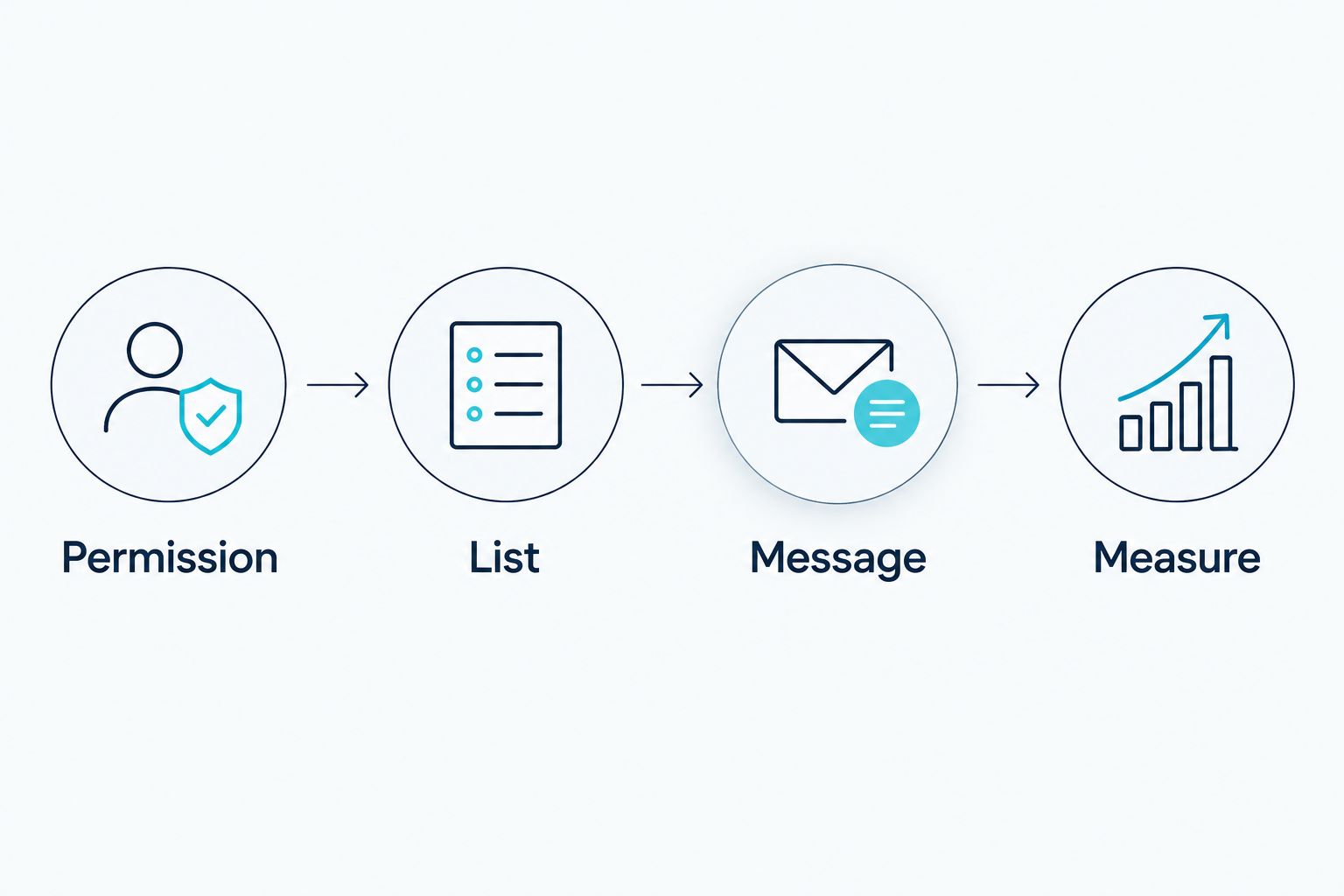
For a 2026 decision, test the actual work rather than comparing screenshots. Use a small set of contacts who agreed to receive your messages. Keep the same draft and audience criteria across the platforms you are considering so the difference you notice is the workflow.
- Permission: Write down where each test contact opted in and what they agreed to receive. Do not import an old spreadsheet simply because it contains email addresses.
- List: Add a relevant audience group and check how a contact is removed. Do not assume a CRM record is a newsletter subscription.
- Message: Build one useful email, then send previews to two test inboxes. Check the subject line, links, mobile layout and unsubscribe route.
- Measure: After sending, review delivery problems, unsubscribes and link activity. Choose a 30-day review period for the first campaign rather than declaring success from a single send.
If you plan to send one email per week, build that schedule into your test. A tool that feels easy for one draft still needs to fit the way you will update the list and repeat the task. Do not add automation until you can explain who enters it, what they receive and how they leave.
How we ranked these tools
This 2026 ranking puts a basic newsletter first because it is the clearest starting brief for a small business choosing an email tool. Brevo moves ahead when transactional messages are required; Zoho Campaigns becomes the more relevant choice when Zoho CRM is already part of the workflow. Mailchimp remains a useful comparison for a team focused on templates. These are use-case recommendations, not claims that one platform wins every feature or fits every contact list.
Which email marketing tool should you choose?
Choose MailerLite if you are undecided and your first job is a regular newsletter. Choose Brevo when you have defined both marketing and transactional messages. Choose Zoho Campaigns when an existing Zoho CRM workflow drives the decision; test Mailchimp if template-led editing matters most to your team.
If the obstacle is time, copy or setup rather than software choice, separate that problem from the platform purchase. Blessing M Digital offers email marketing services to South African businesses. Ask for the scope and deliverables in writing before work starts; a service is not the same thing as a subscription to an email tool.
FAQ
What is the best email marketing tool for a South African small business in 2026?
MailerLite is the default choice for a small business starting a regular newsletter in 2026. Choose Brevo instead if your brief includes both marketing and transactional email.
Is Brevo better than MailerLite for a newsletter?
MailerLite is the clearer starting pick for a straightforward newsletter. Brevo becomes more relevant when transactional messages are also part of the work.
Should I choose Zoho Campaigns if I use Zoho CRM?
Zoho Campaigns belongs on your shortlist if you already use Zoho CRM. Test whether the contact groups you want to email match your permission records before connecting a full audience.
Can I email everyone in my customer database?
No, a customer record alone does not establish permission for marketing email. Check how each contact joined, what they agreed to receive and which POPIA rules apply to your messages.
Do I need an agency to use an email marketing tool?
No, you can manage a tool yourself if someone can maintain the list, prepare campaigns and review results. Blessing M Digital offers email marketing services when you need help with that work rather than another platform to manage alone.
What should I test before moving my email list?
Test consent records, audience grouping, message previews and unsubscribe handling. Use contacts who agreed to receive your emails instead of importing an unverified spreadsheet.
One last thing
In 2026, the most useful first campaign is one you can explain before you send it: who asked to receive it, why the message is relevant and what you will check afterwards. If you cannot answer those questions, fix the list and message before switching platforms.