

The best ATS-friendly CV template for most South African job applications in 2026 is a plain, single-column CV with work experience in reverse chronological order. Use a skills-first version if you are changing careers, and follow the file-format instructions in each job advert.
- Best overall: a single-column, reverse-chronological CV for South African applicants with relevant work history.
- Best for career changes: a single-column, skills-first CV that still shows employers and dates clearly.
- For ats friendly cv templates south africa, clear headings and editable text matter more than visual decoration.
- Blessing M Digital's CV & Job-Search System is a ready-made job-search product, not an ATS guarantee.
Why this matters
An attractive CV can be difficult to read if its text sits inside graphics or an elaborate layout. In 2026, choose a template that presents your details as ordinary text, then check the finished file yourself. No template guarantees that every applicant tracking system will interpret it correctly.
The South African CV & Job-Search System from Blessing M Digital is a ready-made product for job seekers. It is different from a done-for-you CV-writing service. Check the product's included files and formats before deciding whether it meets a particular employer's submission requirements.
What makes the best ATS-friendly CV template?
Use these criteria before choosing a design:
- Single-column layout: Keep your career history in a straightforward reading order. Avoid sidebars that split essential details from the roles they describe.
- Recognisable headings: Use headings such as Work Experience, Education and Skills so a reader can find the relevant section quickly.
- Editable text: Your name, dates, qualifications and achievements should be selectable text, not words embedded in an image.
- Clear dates and employers: State who employed you, what you did and when. A skills section should not hide your work history.
- Appropriate length: Two pages suit most South African CVs; one page often suits school leavers, while three pages can suit senior roles with substantial relevant experience.
- Advert-led file format: Submit the file type requested by the employer. Do not assume a PDF or a Word document is always the right choice.
A simple layout makes mistakes easier to spot, too. If a template needs you to squeeze text into small boxes, it is working against the information you need to present.
ATS-friendly CV templates at a glance
| Template approach | Best for | Standout feature | Key limitation |
|---|---|---|---|
| Single-column reverse-chronological CV | Applicants with relevant work history | Puts recent roles and dates in order | Gives less prominence to transferable skills |
| Single-column skills-first CV | Career changers | Introduces relevant skills before job history | Can look evasive if employment dates are hard to find |
| Plain Google Docs CV | Applicants editing in a browser | Starts from an editable document | Needs deliberate formatting to stay consistent |
| Plain-text CV | Applications asking for pasted text | Removes layout from the submission | Difficult to scan as a standalone CV |
The layout choice: simple does not mean empty
Single-column layout puts Contact Details, Work Experience, Education and Skills in a clear sequence. A decorative layout can separate those details into sidebars, icons or text boxes. The useful test is whether someone can copy the CV's text into a blank document and still understand the order.
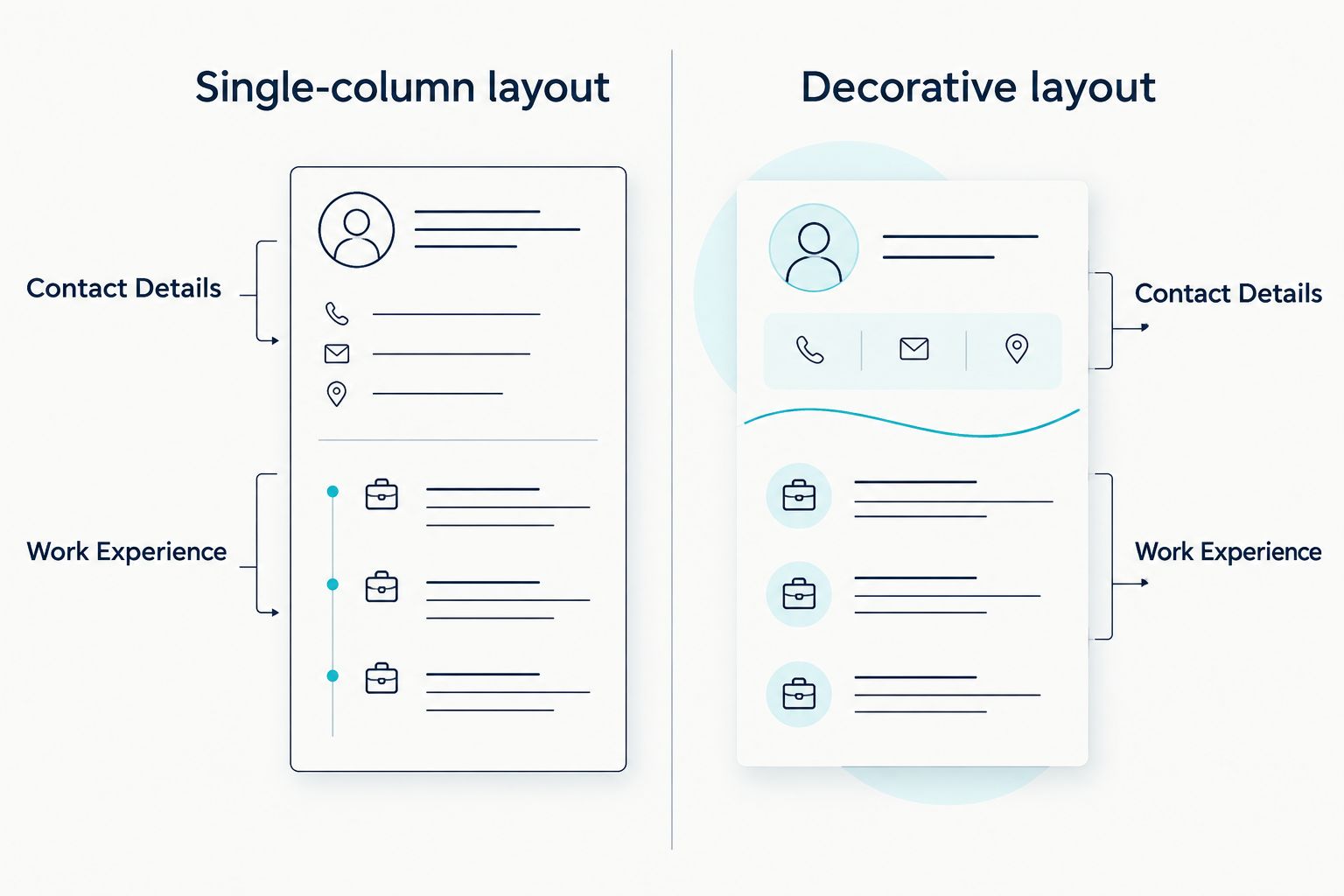
Do not mistake simplicity for a lack of detail. A plain CV still needs evidence: the roles you held, relevant qualifications and concise examples of what you did. The layout should make those facts easier to find, not replace them.
1. Single-column reverse-chronological CV: best for work history
Best for: You have roles, internships or other experience relevant to the job you want. Put your most recent role first, then work backwards. Give each role an employer, job title, dates and short bullets describing relevant work.
This is the default choice for most applicants because an employer can see your recent experience without searching through a skills summary. Keep the design plain even if you create it in Word or Google Docs.
Reverse-chronological CV pros:
- Shows the progression of your work clearly.
- Makes employers and employment dates easy to find.
- Leaves room to tailor bullets to a specific advert.
Reverse-chronological CV cons:
- A career change can make your most relevant skills less visible at first glance.
- You must edit older roles down to keep the CV focused.
Verdict: Choose the reverse-chronological layout if your recent experience supports the role you are applying for. Do not add a sidebar just to make a straightforward CV look more designed.
2. Single-column skills-first CV: best for career changes
Best for: You are applying for work that draws on skills gained in a different job, course or project. Open with a short relevant-skills section, then show your employment and education with clear dates. This changes the order of emphasis; it does not remove your history.
For example, a South African applicant moving from retail into an administrative role can lead with relevant record-keeping and customer-service experience. The bullets must describe work they actually did, not duties copied from an advert.
Skills-first CV pros:
- Brings transferable experience nearer the top.
- Helps you connect previous work to a different role.
- Keeps employment details available for the reader to check.
Skills-first CV cons:
- A long skills list delays the evidence behind it.
- Employers may struggle to place a skill in context if the supporting role is unclear.
Verdict: Choose a skills-first layout when your relevant experience needs explanation. Skip a version that hides employers or dates: you still need a traceable work history.
3. Plain Google Docs CV: best for browser editing
Best for: You want to draft and revise your CV in a browser. Start with a blank document and build a single-column structure using ordinary headings and bullets. The editing tool is less important than the finished layout.
Check each section after exporting the file requested in the job advert. A CV that looks orderly while you edit it can still need a final review once saved in its submission format.
Google Docs CV pros:
- Lets you edit text directly rather than working around a graphic design.
- Makes it straightforward to maintain a plain, single-column draft.
- Gives you a document you can revise for different applications.
Google Docs CV cons:
- A blank document provides no judgement about which details to include.
- Inconsistent manual formatting can make the final file harder to scan.
Verdict: Choose a plain Google Docs CV if browser editing suits you. Skip decorative templates with important information placed in sidebars or graphics.
4. Plain-text CV: best for pasted application fields
Best for: An application asks you to paste your CV or work history into a text field. Keep a plain-text copy with clear headings, employers and dates so you can transfer the information without relying on visual formatting.
A plain-text copy is a useful companion to your main CV, not an automatic replacement for it. If an employer asks for an attached file, follow that instruction instead of pasting text where it was not requested.
Plain-text CV pros:
- Keeps the emphasis on words rather than layout.
- Gives you text you can paste into application fields.
- Makes missing dates or headings easier to notice.
Plain-text CV cons:
- Offers little visual separation between sections.
- Needs careful line breaks to remain readable.
Verdict: Choose plain text for a form that requires it. Skip it as your default attachment unless the employer specifically asks for that format.
How to check your CV before sending it
Work through this short check in 2026, regardless of which template you choose:
- Match the advert. Check the requested file type and any application instructions before you export anything.
- Read from the top. Confirm your contact details, work history, education and skills appear in a sensible order.
- Select the text. Try to highlight and copy your name, headings and role details from the final file. If important words are part of an image, replace them with text.
- Paste into a blank document. Look for scrambled dates, missing lines or details that no longer sit beside the right employer.
- Remove unnecessary personal details. Do not add your South African ID number, a photo or a full street address merely because a template has space for them.
- Check referees. If you include them, ask permission and confirm their contact details. Two or three relevant referees are a practical South African CV convention; follow any different instruction in the advert.
Then read the CV as a hiring manager would. Can you tell which role is current, which qualification is relevant and how to contact the applicant? If not, revise the wording before trying another design.
How these options are ranked
The ranking puts reading order, visible work history and editable text ahead of appearance. The reverse-chronological layout wins for applicants whose recent roles speak for themselves. Skills-first comes next for career changes; Google Docs and plain text address specific editing and submission needs rather than offering a better career-history structure.
Blessing M Digital's CV & Job-Search System is not ranked as an ATS-friendly template because its product name alone does not establish the format of its included files. If you are considering it, compare what the product includes with the criteria above. A ready-made product and a personalised CV-writing service solve different tasks.
Which ATS-friendly CV template should you choose?
Choose a single-column, reverse-chronological CV unless your application gives you a clear reason to change the order. Use the skills-first version when you need to connect experience from another field to the advertised role. Keep a plain-text copy for forms, and treat Word or Google Docs as editing tools rather than proof that a CV is ATS-friendly.
That is the practical answer to choosing ATS-friendly CV templates in South Africa in 2026: show the right evidence clearly, preserve it in the submitted file and follow the employer's instructions. No design can make an untailored CV relevant to a job it does not address.
FAQ
What is the best ATS-friendly CV template in South Africa in 2026?
A plain, single-column reverse-chronological CV is the best default for applicants with relevant work history. It keeps employers, roles and dates easy to find.
Is a skills-first CV better than a reverse-chronological CV?
A skills-first CV is better when you need to explain transferable experience for a career change. Keep your employers and employment dates visible below the skills section.
Can I use Google Docs for an ATS-friendly CV?
Yes, you can create a plain CV in Google Docs. Check the exported file's reading order and submit the format requested in the advert.
Should I send my CV as a PDF or a Word document?
Send the file type the employer requests. If the advert gives no preference, inspect whichever file you submit to confirm its text is selectable and its layout remains readable.
How long should a South African CV be?
Two pages suit most South African CVs. One page often suits school leavers, while three pages can suit senior applicants with substantial relevant experience.
Should my South African CV include my ID number and photo?
Do not add an ID number or photo just because a template has fields for them. Use the application instructions to decide what personal information the employer actually requests.
Is Blessing M Digital's CV & Job-Search System a done-for-you CV service?
No. Blessing M Digital's CV & Job-Search System is a ready-made product, which is different from a personalised CV-writing service. Check its included files against the requirements of the job you are applying for.
One last thing
A template's most useful test takes place after you finish editing: copy the text out of the file you intend to send. If the role, employer and dates no longer read together, fix the file before applying. That check is more useful than trusting an ATS-friendly label on a template in 2026.